
Running the whole sixaxis emulator in a Linux Virtual Machine (with VirtualBox) was my first try.
But I discovered the input devices mapping from the host to the guest is not adapted at all: the mouse and the keyboard are emulated by VirtualBox, making the latency of the mouse higher, and breaking the precision of a high-end mouse.
Then I realized that the client/server architecture allows to run the emu and emuclient processes on different machines.
As you can see in the below screenshot, I decided to run the emu (which sends data to the PS3) in a Linux Virtual Machine with a command-line only linux (slitaz-base), and the emuclient (which grabs input device events) in the host Windows machine. The emuclient connects and send data to the emu through TCP/IP. The installation of slitaz+sixaxis-emulator librairies takes about 350Mo of disk space.
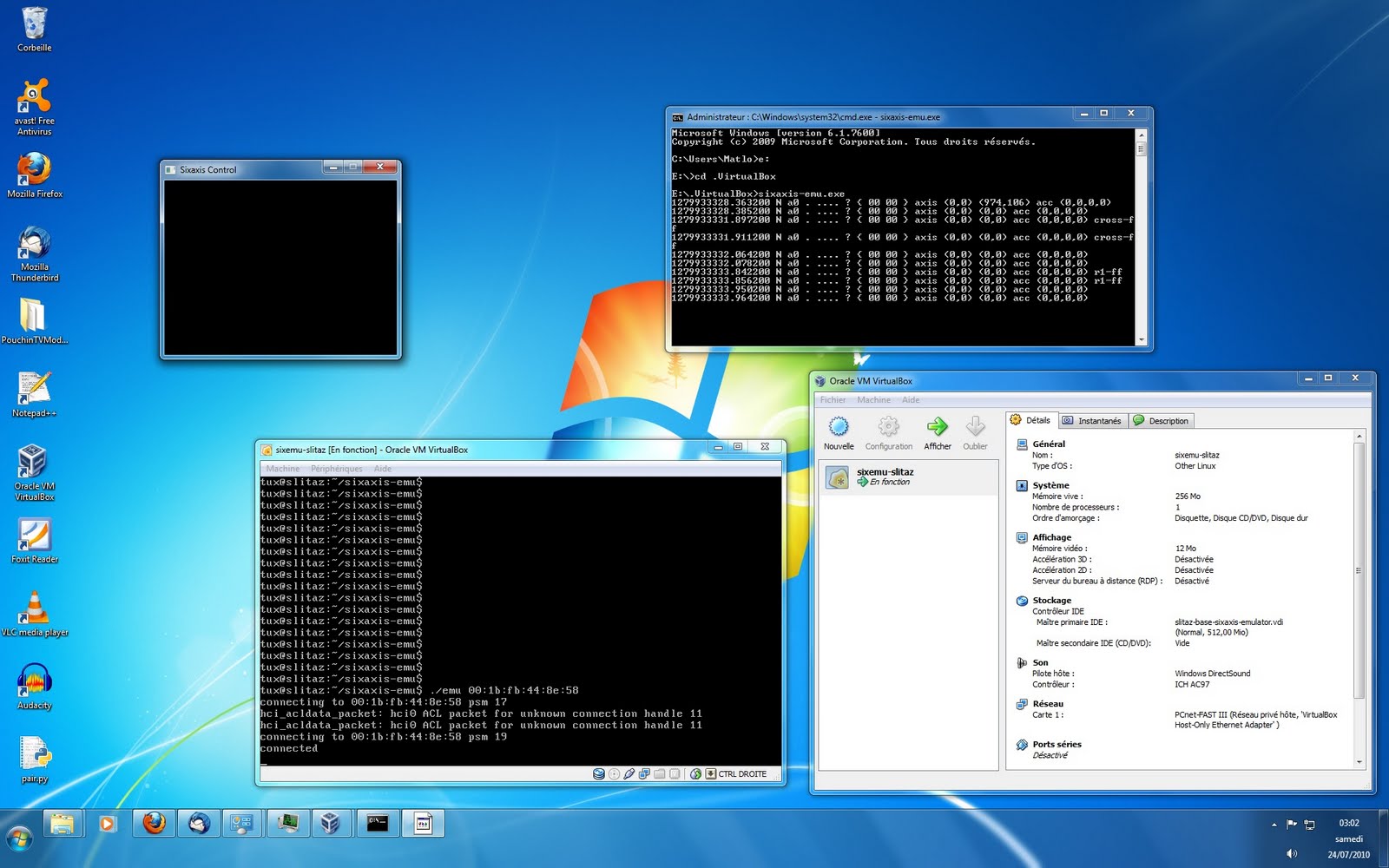
It works (seems to be playable), but not as good as the Linux-only solution: there obviously is more latency.
EDIT: some details if you want to try that.
Notes:
– Perform the sixaxis emulator tutorial in a VM first (if step 1 doesn’t work, try that step with a livecd).
– The network interface of the VM has to be configured in “Host-only networking” (that’s how it is called in VirtualBox, see there). If you can ping the VM Guest Linux from the Host Windows and vice versa, it should work!
– The usb bluetooth dongle has to be added to the VM usb devices.
1/ [VM/Guest Linux] in emu.c, change that line in tcp_listen function:
addr.sin_addr.s_addr = htonl(INADDR_LOOPBACK); // Listen only on localhost
to
addr.sin_addr.s_addr = htonl(INADDR_ANY); // Listen on any interface
Recompile emu process (make).
2/ [Host Windows] Get http://www.libsdl.org/release/SDL-1.2.14-win32.zip
Extract it. Copy SDL.dll to C:\Windows
3/ [Host Windows] Get http://diyps3controller.googlecode.com/files/sixaxis-emu.exe
4/ [VM/Guest Linux] Launch emu process as in the sixaxis emulator tutorial. It should power on the PS3.
5/ [Host Windows] Launch sixaxis-emu.exe with the ip address of the VM/ Guest Linux as argument. It should connect to the emu process running in the Guest Linux.
Maybe the first fledgling steps to an elegant Windows solution? Possibilities are very exciting…
Added some details if someone wants to try that.